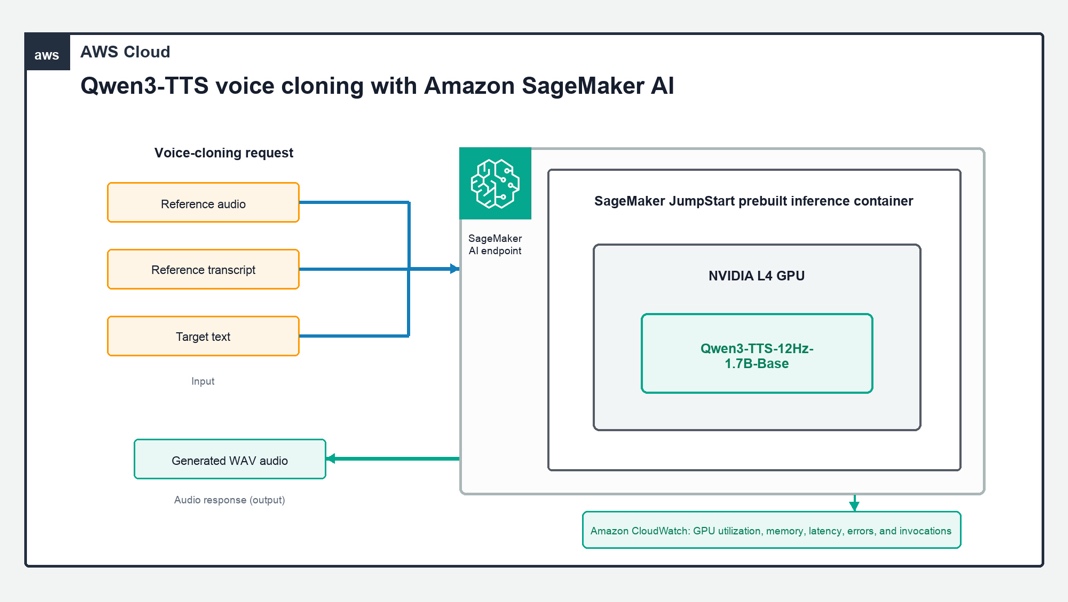
Deploying real-time personalized speech with Qwen3-TTS on Amazon SageMaker AI
How-To How to actually use this
What changed: Qwen3-TTS-12Hz-1.7B-Base is now deployable as a real-time endpoint via Amazon SageMaker JumpStart with voice cloning from short reference audio.
How to use it:
- Open Amazon SageMaker Studio and navigate to the JumpStart model hub.
- Search for "Qwen3-TTS-12Hz-1.7B-Base" and select the model card.
- Choose "Deploy" to launch a fully managed real-time inference endpoint; wait for "InService" status.
- Send an inference request to the endpoint with your input text and a short reference audio clip (base64 encoded or S3 URI) to clone the target voice.
- Receive the generated speech audio stream; test cross-lingual input to verify speaker identity preservation.
Good for: developers building real-time personalized voice applications.
Deploy the publicly available Qwen3-TTS-12Hz-1.7B-Base text-to-speech model from Amazon SageMaker JumpStart to a fully managed, real-time endpoint, and clone a voice from a short reference clip. Cross-lingual cloning preserves the speaker's identity across languages.
Read original article on Artificial Intelligence →More in Products & Tools