Build real-time voice applications with vLLM-Omni on SageMaker AI – Part 1
How-To How to actually use this
What changed: AWS released a vLLM-Omni Deep Learning Container for SageMaker AI to deploy and stream text-to-speech models like Qwen3-TTS over persistent bidirectional connections.
How to use it:
- Launch an Amazon SageMaker AI endpoint using the AWS vLLM-Omni Deep Learning Container image.
- Configure the endpoint to serve the Qwen3-TTS model for text-to-speech inference.
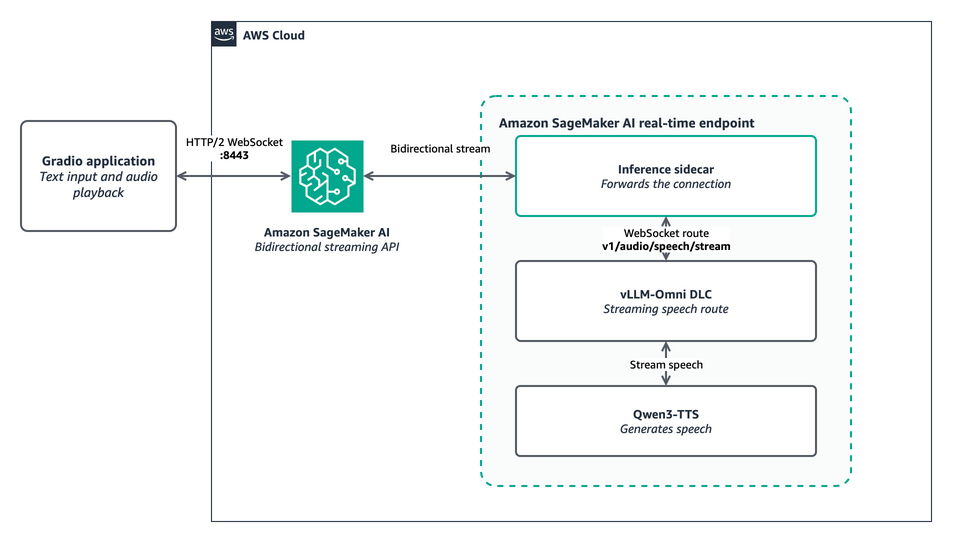
- Build a Gradio application that opens a persistent bidirectional connection to the SageMaker endpoint.
- Send text input from the Gradio UI to the endpoint and stream the generated audio chunks back in real-time.
- Play the streamed audio output directly in the Gradio interface as it arrives.
Good for: developers building real-time voice applications on AWS
Deploy a text-to-speech model on Amazon SageMaker AI with the AWS vLLM-Omni Deep Learning Container and stream generated speech over a persistent bidirectional connection. This Part 1 tutorial deploys Qwen3-TTS and streams speech through a Gradio application.
Read original article on Artificial Intelligence →More in Products & Tools