Generate images and video with vLLM-Omni on SageMaker AI – Part 2
How-To How to actually use this
What changed: AWS SageMaker AI now supports deploying FLUX.2-klein and Wan2.1-VACE together in a single vLLM-Omni container for sequential image-to-video generation.
How to use it:
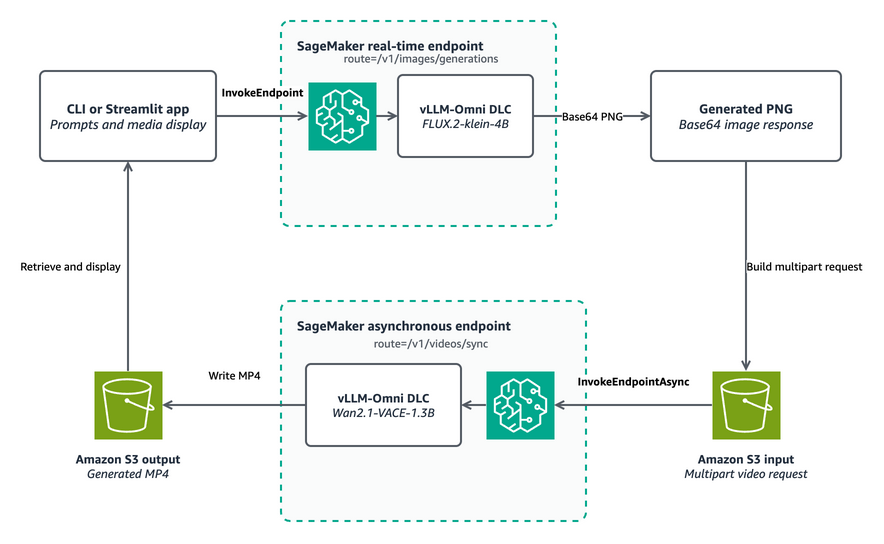
- Deploy the vLLM-Omni Deep Learning Container to a SageMaker AI real-time inference endpoint for FLUX.2-klein.
- Send a prompt to the endpoint to generate an image and save the output.
- Deploy the same container to a SageMaker AI asynchronous inference endpoint configured for Wan2.1-VACE.
- Submit the generated image and a motion prompt to the async endpoint to start the video generation job.
- Retrieve the resulting MP4 file from the designated Amazon S3 output bucket once the job completes.
Good for: developers building image-to-video pipelines on AWS
Deploy two generative media models from one AWS vLLM-Omni Deep Learning Container on Amazon SageMaker AI. Generate an image with FLUX.2-klein through real-time inference, then animate it into video with Wan2.1-VACE through asynchronous inference, and retrieve the MP4 from Amazon S3.
Read original article on Artificial Intelligence →More in Products & Tools