Build a multi-account AI agent with AgentCore Gateway and MCP
How-To How to actually use this
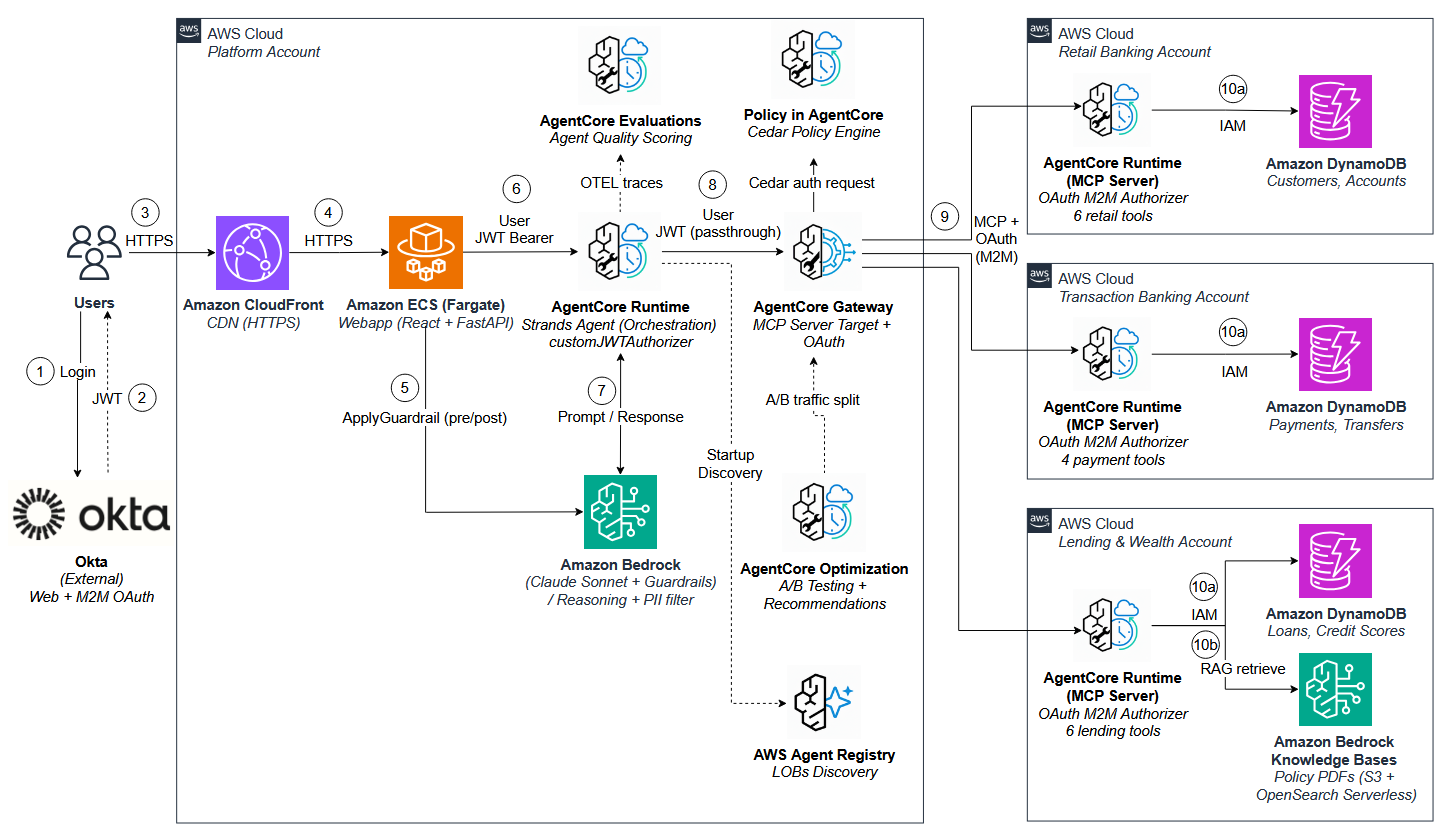
What changed: AWS published a pattern for running a central AI agent that securely queries data across multiple AWS accounts using AgentCore Gateway and MCP.
How to use it:
- Set up a platform AWS account and deploy the AI agent with Amazon Bedrock AgentCore Gateway.
- In each line-of-business account, expose data sources as MCP servers.
- Configure cross-account IAM roles and fine-grained policies so the platform account can call the MCP servers.
- Register each MCP server endpoint with the AgentCore Gateway in the platform account.
- Test the agent by asking it to retrieve or combine data from the different accounts.
Good for: platform teams building secure multi-account AI assistants
Build a multi-account architecture that keeps each team's data in its own AWS account while giving AI agents a unified way to query across them. A central platform account runs the agent using Amazon Bedrock AgentCore Gateway and MCP, while line-of-business accounts expose their data as MCP servers with secure cross-account access and fine-grained authorization.
Read original article on Artificial Intelligence →More in Products & Tools